.png)
Easier network access for AI Runway
I recently blogged about using AI Runway, but the networking setup was not ideal. The reason for that was that I couldn’t get the setup recommended by the AI Runway team up and running, but with their help I could figure it out. Therefore, this is just a small update on how that works.
The TL;DR
In the previous blog post, I created a dedicated Traefik ingress per model, which is of course not ideal. Instead, having a single gateway with the Gateway API Inference Extension which addresses the right model based on the request makes sense and that is also what the AI Runway docs suggest. With that in place and Llama-3.2:1B deployed, something like this works where 20.170.89.88 is the IP of the gateway
Request
1
2
3
4
POST http://20.170.89.88/v1/chat/completions
Content-Type: application/json

{"model": "llama-3.2-1b-instruct", "messages": [{"role": "user", "content": "who are you?"}]}
Response
1
2
3
4
5
6
7
8
9
10
11
12
13
14
15
16
17
18
19
20
21
22
23
24
25
26
27
28
29
30
31
HTTP/1.1 200 OK
x-envoy-upstream-service-time: 1391
x-went-into-resp-headers: true
content-type: application/json
x-correlation-id: d691d871-689c-48c3-a2af-a7a3eef237c0
date: Sun, 26 Apr 2026 09:14:16 GMT
server: istio-envoy
connection: close
transfer-encoding: chunked

{
  "choices": [
    {
      "finish_reason": "stop",
      "index": 0,
      "message": {
        "content": "I'm an artificial intelligence model known as Llama. Llama stands for \"Large Language Model Meta AI.\"",
        "role": "assistant"
      }
    }
  ],
  "created": 1777194855,
  "id": "d98279a5-6588-464a-8245-40e20b4a9220",
  "model": "llama-3.2-1b-instruct",
  "object": "chat.completion",
  "usage": {
    "completion_tokens": 23,
    "prompt_tokens": 15,
    "total_tokens": 38
  }
}
This might look similar to before, but I can now also deploy e.g. Gemma2:2B and do something like the following. Note that only the model in the request body changes
Request
1
2
3
4
POST http://20.170.89.88/v1/chat/completions
Content-Type: application/json

{"model": "gemma-2-2b-instruct", "messages": [{"role": "user", "content": "who are you?"}]}
Response
1
2
3
4
5
6
7
8
9
10
11
12
13
14
15
16
17
18
19
20
21
22
23
24
25
26
27
28
29
30
31
HTTP/1.1 200 OK
x-envoy-upstream-service-time: 16533
x-went-into-resp-headers: true
date: Sun, 26 Apr 2026 09:16:58 GMT
content-type: application/json
x-correlation-id: da4973c9-721d-46fb-b237-b420e805b6ca
server: istio-envoy
connection: close
transfer-encoding: chunked

{
  "choices": [
    {
      "finish_reason": "stop",
      "index": 0,
      "message": {
        "content": "I am Gemma, an open-weights AI assistant. I'm a large language model, created by the Gemma team. I can generate text, translate languages, write different kinds of creative content, and answer your questions in an informative way. \n\nThink of me as a friendly AI companion who loves to chat and explore ideas with you!  😊  \n",
        "role": "assistant"
      }
    }
  ],
  "created": 1777195003,
  "id": "ddefa22d-70df-4e14-8c94-8f2a3684446c",
  "model": "gemma-2-2b-instruct",
  "object": "chat.completion",
  "usage": {
    "completion_tokens": 74,
    "prompt_tokens": 13,
    "total_tokens": 87
  }
}
Nice, right? As the setup is actually straight forward and it was more a failure on my side to do it right (and a small issue in AI Runway) that prevented it from working last time, there are not a lot of details to share. But if you want a step by step instruction on how to set it up, check the next section.
The details: Istio and body-based router
First we need the Gateway API and the Inference Extension as explained above:
1
2
3
4
5
6
7
8
9
10
11
12
13
14
15
16
17
18
19
PWSH C:\Users\tobia> kubectl apply -f https://github.com/kubernetes-sigs/gateway-api/releases/latest/download/standard-install.yaml
customresourcedefinition.apiextensions.k8s.io/backendtlspolicies.gateway.networking.k8s.io created
customresourcedefinition.apiextensions.k8s.io/gatewayclasses.gateway.networking.k8s.io created
customresourcedefinition.apiextensions.k8s.io/gateways.gateway.networking.k8s.io created
customresourcedefinition.apiextensions.k8s.io/grpcroutes.gateway.networking.k8s.io created
customresourcedefinition.apiextensions.k8s.io/httproutes.gateway.networking.k8s.io created
customresourcedefinition.apiextensions.k8s.io/listenersets.gateway.networking.k8s.io created
customresourcedefinition.apiextensions.k8s.io/referencegrants.gateway.networking.k8s.io created
customresourcedefinition.apiextensions.k8s.io/tlsroutes.gateway.networking.k8s.io created
validatingadmissionpolicy.admissionregistration.k8s.io/safe-upgrades.gateway.networking.k8s.io created
validatingadmissionpolicybinding.admissionregistration.k8s.io/safe-upgrades.gateway.networking.k8s.io created
PWSH C:\Users\tobia> kubectl apply -f https://github.com/kubernetes-sigs/gateway-api-inference-extension/releases/download/v1.3.1/manifests.yaml
customresourcedefinition.apiextensions.k8s.io/inferencemodelrewrites.inference.networking.x-k8s.io created
Warning: resource customresourcedefinitions/inferenceobjectives.inference.networking.x-k8s.io is missing the kubectl.kubernetes.io/last-applied-configuration annotation which is required by kubectl apply. kubectl apply should only be used on resources created declaratively by either kubectl create --save-config or kubectl apply. The missing annotation will be patched automatically.
customresourcedefinition.apiextensions.k8s.io/inferenceobjectives.inference.networking.x-k8s.io configured
customresourcedefinition.apiextensions.k8s.io/inferencepoolimports.inference.networking.x-k8s.io created
Warning: resource customresourcedefinitions/inferencepools.inference.networking.k8s.io is missing the kubectl.kubernetes.io/last-applied-configuration annotation which is required by kubectl apply. kubectl apply should only be used on resources created declaratively by either kubectl create --save-config or kubectl apply. The missing annotation will be patched automatically.
customresourcedefinition.apiextensions.k8s.io/inferencepools.inference.networking.k8s.io configured
customresourcedefinition.apiextensions.k8s.io/inferencepools.inference.networking.x-k8s.io created
Then we install Istio. Notable is the ENABLE_GATEWAY_API_INFERENCE_EXTENSION setting:
1
2
3
4
5
6
7
8
9
10
11
12
13
14
15
16
17
18
19
20
21
PWSH C:\Users\tobia> istioctl install --set values.pilot.env.ENABLE_GATEWAY_API_INFERENCE_EXTENSION=true
        |\
        | \
        |  \
        |   \
      /||    \
     / ||     \
    /  ||      \
   /   ||       \
  /    ||        \
 /     ||         \
/______||__________\
____________________
  \__       _____/
     \_____/

This will install the Istio 1.29.1 profile "default" into the cluster. Proceed? (y/N) y
✔ Istio core installed ⛵️
✔ Istiod installed 🧠
✔ Ingress gateways installed 🛬
✔ Installation complete
With that, the base requirements are in place and we can create the inference gateway and deploy the body-based router:
1
2
3
4
5
6
7
8
9
10
11
12
13
14
15
16
17
18
19
20
21
22
23
24
25
26
27
28
29
30
31
32
33
34
PWSH C:\Users\tobia> kubectl create namespace gateway
namespace/gateway created
PWSH C:\Users\tobia> @"
>> apiVersion: gateway.networking.k8s.io/v1
>> kind: Gateway
>> metadata:
>>   name: inference-gateway
>>   namespace: gateway
>> spec:
>>   gatewayClassName: istio  # Change to match your implementation
>>   infrastructure:
>>     annotations:
>>       # Required on AKS with Istio. Azure otherwise probes GET / on port 80,
>>       # but the gateway returns 404 there and the public IP can time out.
>>       service.beta.kubernetes.io/port_80_health-probe_protocol: tcp
>>   listeners:
>>     - name: http
>>       protocol: HTTP
>>       port: 80
>> "@ | kubectl apply -f -
gateway.gateway.networking.k8s.io/inference-gateway created
PWSH C:\Users\tobia> helm install body-based-router -n gateway --set provider.name=istio --version v1.3.1 oci://registry.k8s.io/gateway-api-inference-extension/charts/body-based-routing
Pulled: registry.k8s.io/gateway-api-inference-extension/charts/body-based-routing:v1.3.1
Digest: sha256:aedc6a36cdf1bf34d41886c525275b26711ce15996affc39d4eb94cd1f0f2dc8
I0426 10:47:03.065464   35936 warnings.go:110] "Warning: EnvoyFilter exposes internal implementation details that may change at any time. Prefer other APIs if possible, and exercise extreme caution, especially around upgrades."
NAME: body-based-router
LAST DEPLOYED: Sun Apr 26 10:47:02 2026
NAMESPACE: gateway
STATUS: deployed
REVISION: 1
DESCRIPTION: Install complete
TEST SUITE: None
NOTES:
Body-based routing extension deployed.
And that’s already it. We only need to figure out what the IP for our gateway is, e.g. like this
1
2
3
PWSH C:\Users\tobia> kubectl get gateway -n gateway inference-gateway
NAME                CLASS   ADDRESS        PROGRAMMED   AGE
inference-gateway   istio   20.170.89.88   True         15s
Or we can take a look into the AI Runway settings, which give us the same information
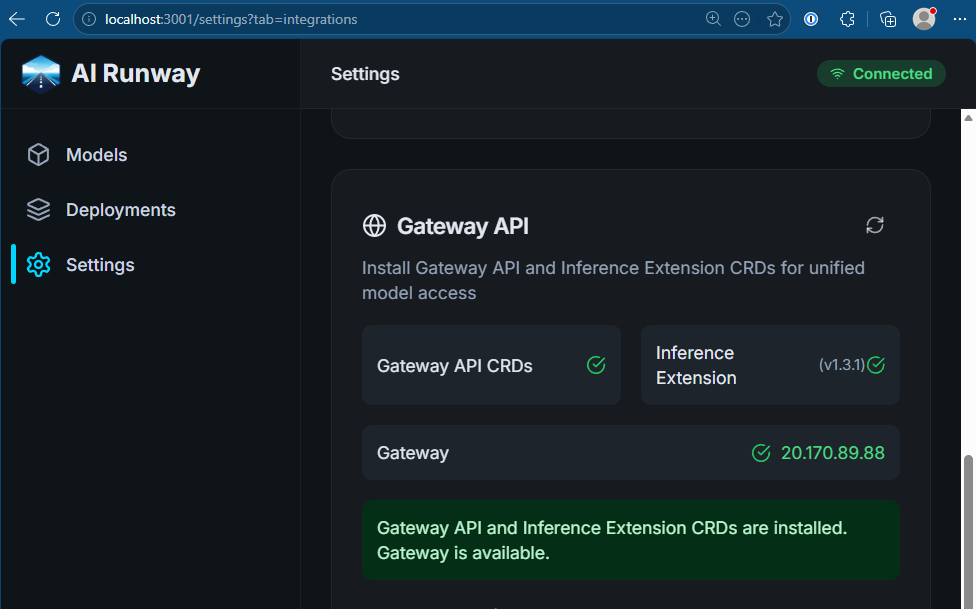
After deploying models as explained in the last blog post, we can now run inference against that IP as shown above. If you look into the deployments in the AI Runway dashboard, you even get a ready to run example
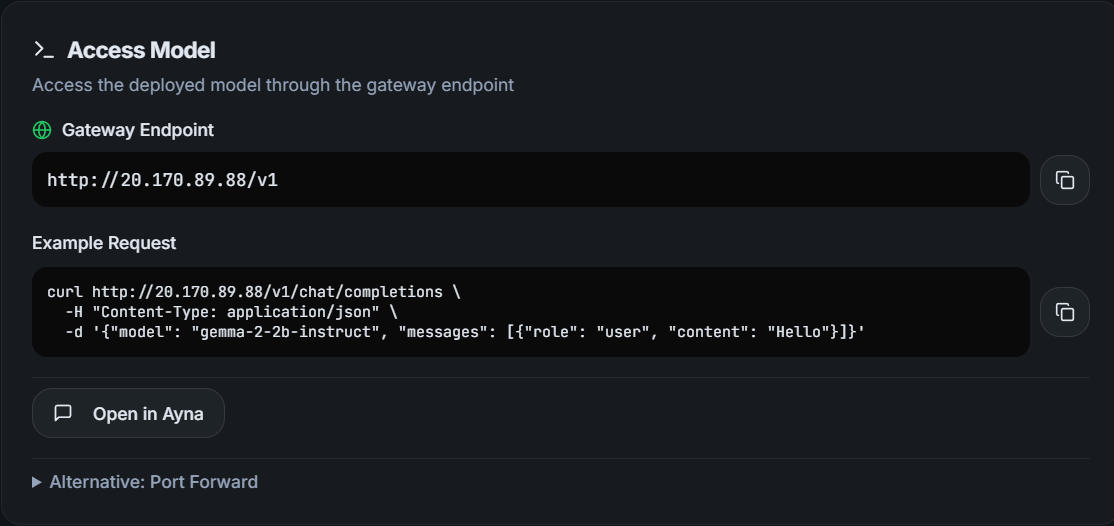
Just copy/pasting it works like a charm:
1
2
PWSH C:\Users\tobia> curl http://20.170.89.88/v1/chat/completions -H "Content-Type: application/json" -d '{"model": "gemma-2-2b-instruct", "messages": [{"role": "user", "content": "Hello"}]}'
{"choices":[{"finish_reason":"stop","index":0,"message":{"content":"Hello! 👋  \n\nHow can I help you today? 😊 \n","role":"assistant"}}],"created":1777196088,"id":"b116b6f2-7b36-4f71-9f40-49266b9830d3","model":"gemma-2-2b-instruct","object":"chat.completion","usage":{"completion_tokens":16,"prompt_tokens":10,"total_tokens":26}}
Thanks to the AI Runway team, this is an amazingly easy starting point into running LLMs on your own Kubernetes backend!
Webmentions:
No webmentions were found.


No reposts were found.