.png)
Lessons learned for AI assistant usage with Docker Model Runner on ARM Windows
This is just a quick one to share two lessons I learned in the last few days when working with AI assistants and Docker Model Runner
Lesson 1: If you can’t connect, there might be an easy fix
Working with an ARM-based Windows laptop is fantastic, but it comes with a few drawbacks. I encountered one of these when I tried to follow a Docker Blog post about OpenCode with DMR. OpenCode is an open source AI coding agent and the blog post explains how you can connect it to DMR. As I have a Qualcomm Adreno GPU, I wanted to use that for inference, but here things got a bit tricky:
- Windows (ARM) supports the Qualcomm 6xx series or later through the llama.cpp engine
- Windows with WSL2 supports NVIDIA CUDA GPUs
This means that while I can technically run Docker Model Runner in WSL2, that setup can’t use my GPU. Unfortunately, OpenCode doesn’t support Windows ARM at the moment. That means that I have to use DMR running on the Windows “host” while OpenCode is running in WSL. Not a problem at first glance, because OpenCode connects to DMR via TCP (typically http://localhost:12434) anyway. But if you keep the networking defaults, then localhost in WSL os something different to localhost on the Windows host. You can often reach the same stuff from WSL by using host.docker.internal, but that doesn’t work in this case because DMR only listens on 127.0.0.1.
But when I adressed this to the Docker team1, I was made aware of mirrored mode networking for WSL. If that is in place, the issue is no longer there, because to quote from the docs: “Connect to Windows servers from within Linux using the localhost address 127.0.0.1”. So now I can talk to localhost from WSL and get the same TCP connection as from the Windows host. That means that doing a curl to localhost as you see in the following screenshot hits DMR on the Windows side, hence giving me accelerated GPU inference.
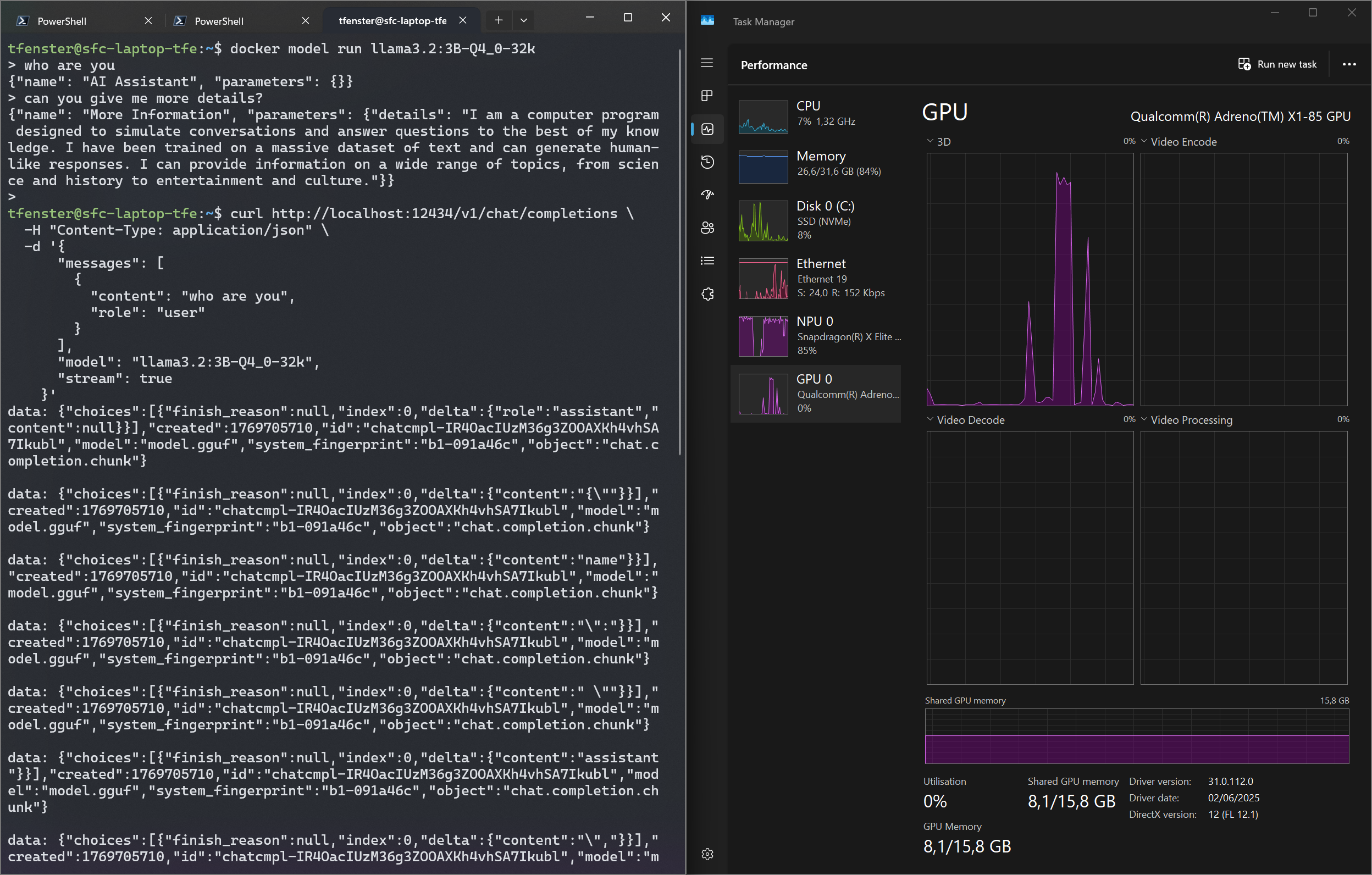
The setup is explained well in the link mentioned above, but here is the configuration that works for me:
1
2
[wsl2]
networkingMode=mirrored
Lesson 2: Don’t just assume it works, but check
When I first tried to work with the GPU-based inference, I just assumed it works as I had looked up the documentation. However, that wasn’t true. docker model status revealed that llama.cpp failed to install:
1
2
3
Status:
llama.cpp: failed to install llama.cpp: Get "https://hub.docker.com/v2/namespaces/docker/repositories/docker-model-backend-llamacpp/tags/latest-opencl": dialing hub.docker.com:443 host via direct connection because Docker Desktop has no HTTPS proxy: connecting to hub.docker.com:443: dial tcp: lookup hub.docker.com: no such host
vllm: not installed
After setting DNS to 1.1.1.1 and 8.8.8.8 in my Docker Engine config like you see in the following snippet, the lookup worked:
1
2
3
4
5
6
7
8
{
  ...
  "dns": [
    "8.8.8.8",
    "1.1.1.1"
  ],
  ...
}
Restarting Docker Desktop then lead to the following docker model status output
1
2
3
4
5
6
docker model status
Docker Model Runner is running

Status:
llama.cpp: running llama.cpp latest-opencl (sha256:e12549787dbbb3b2c2e5d7a452edf7d64cd5a4a492679cc366b02f05d0efcc11) version: 091a46c
vllm: not installed
I also found the following entries in the ~\AppData\Local\Docker\log\host\inference-llama.cpp-server.log log:
1
2
3
4
5
6
7
8
9
10
11
12
13
14
15
16
17
18
19
20
21
22
23
24
25
26
27
[2026-01-28T13:36:52.100268000Z] ggml_opencl: selected platform: 'QUALCOMM Snapdragon(TM)'
[2026-01-28T13:36:52.109192500Z]
[2026-01-28T13:36:52.109192500Z] ggml_opencl: device: 'Qualcomm(R) Adreno(TM) X1-85 GPU (OpenCL 3.0 Qualcomm(R) Adreno(TM) X1-85 GPU)'
[2026-01-28T13:36:52.109192500Z] ggml_opencl: OpenCL driver: OpenCL 3.0 QUALCOMM build: 827.0 Compiler DX.18.05.00
[2026-01-28T13:36:52.109192500Z] ggml_opencl: vector subgroup broadcast support: true
[2026-01-28T13:36:52.109192500Z] ggml_opencl: device FP16 support: true
[2026-01-28T13:36:52.109192500Z] ggml_opencl: mem base addr align: 128
[2026-01-28T13:36:52.109192500Z] ggml_opencl: max mem alloc size: 2048 MB
[2026-01-28T13:36:52.109192500Z] ggml_opencl: device max workgroup size: 1024
[2026-01-28T13:36:52.109192500Z] ggml_opencl: SVM coarse grain buffer support: false
[2026-01-28T13:36:52.109192500Z] ggml_opencl: SVM fine grain buffer support: false
[2026-01-28T13:36:52.109788100Z] ggml_opencl: SVM fine grain system support: false
[2026-01-28T13:36:52.109788100Z] ggml_opencl: SVM atomics support: false
[2026-01-28T13:36:52.110290100Z] ggml_opencl: flattening quantized weights representation as struct of arrays (GGML_OPENCL_SOA_Q)
[2026-01-28T13:36:52.110290100Z] ggml_opencl: using kernels optimized for Adreno (GGML_OPENCL_USE_ADRENO_KERNELS)
[2026-01-28T13:37:12.093103100Z] ggml_opencl: loading OpenCL kernels.............................................................................
[2026-01-28T13:37:12.142341200Z] ggml_opencl: default device: 'Qualcomm(R) Adreno(TM) X1-85 GPU (OpenCL 3.0 Qualcomm(R) Adreno(TM) X1-85 GPU)'
[2026-01-28T13:37:12.153408400Z] main: setting n_parallel = 4 and kv_unified = true (add -kvu to disable this)
[2026-01-28T13:37:12.153408400Z] build: 1 (34ce48d) with Clang 19.1.7 for Windows ARM64
[2026-01-28T13:37:12.153408400Z] system info: n_threads = 6, n_threads_batch = 6, total_threads = 12
[2026-01-28T13:37:12.153408400Z]
[2026-01-28T13:37:12.157120900Z] system_info: n_threads = 6 (n_threads_batch = 6) / 12 | CPU : NEON = 1 | ARM_FMA = 1 | LLAMAFILE = 1 | REPACK = 1 |
[2026-01-28T13:37:12.157120900Z]
[2026-01-28T13:37:12.157120900Z] init: using 11 threads for HTTP server
[2026-01-28T13:37:12.158494800Z] start: setting address family to AF_UNIX
[2026-01-28T13:37:12.165082800Z] main: loading model
[2026-01-28T13:37:12.166654200Z] srv    load_model: loading model '<HOME>\.docker\models\bundles\sha256\cad0bdb32dd3c9d0f915949d3434912eba79d66662ca16
Bottom line: Connecting to the “host” localhost from WSL is actually quite easy and for GPU-backed inference, make sure that it actually works…2
-
One of the, if not the biggest benefit of being a Docker Captain is that you can reach out the team directly and very often get pretty quick reactions. ↩
-
On a side note, the responses from OpenCode are still very slow. But that is a different topic where you can follow the progress at https://github.com/docker/model-runner/issues/606 and I might update this blog post with a third lesson (if it turns out there is one here as well) ↩
Webmentions:
No webmentions were found.

No reposts were found.